- ...>Welcome to Bright Safe - Employee
Welcome to Bright Safe - Employee
Getting Started
We've put together this handy step-by-step course to help you learn all about your new BrightSafe account. Just follow each of the interactive steps to get the most out of your account and find out some of our BrightSafe top tips along the way!
What is BrightSafe?
BrightSafe is our easy to use Health & Safety management software that helps keep up-to-date on all of your H&S training as well as report incidents at work keeping your work environment safe. All you need to do is follow each of the interactive steps in this course and you'll be a BrightSafe expert in no time!
Logging into BrightSafe
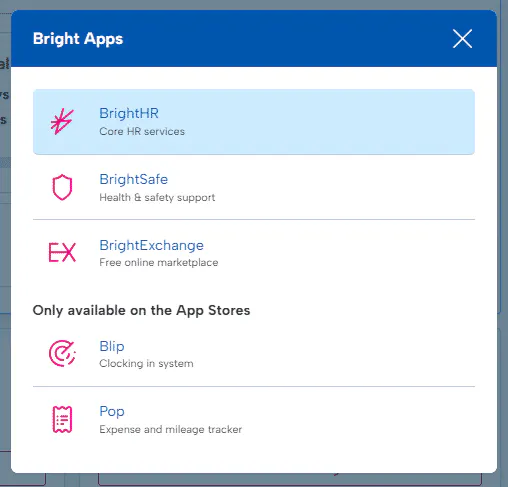
By registering your BrightHR account you'll have access to BrightSafe too, just head over to BrightHR to login. You can then access BrightSafe from the apps drop down in the top left, simple!
Forgot your password? No problem check out this handy video showing you how easy it is to reset it!
Now that you know a little more about BrightSafe and how to access it, let's get started!
Your BrightSafe Dashboard
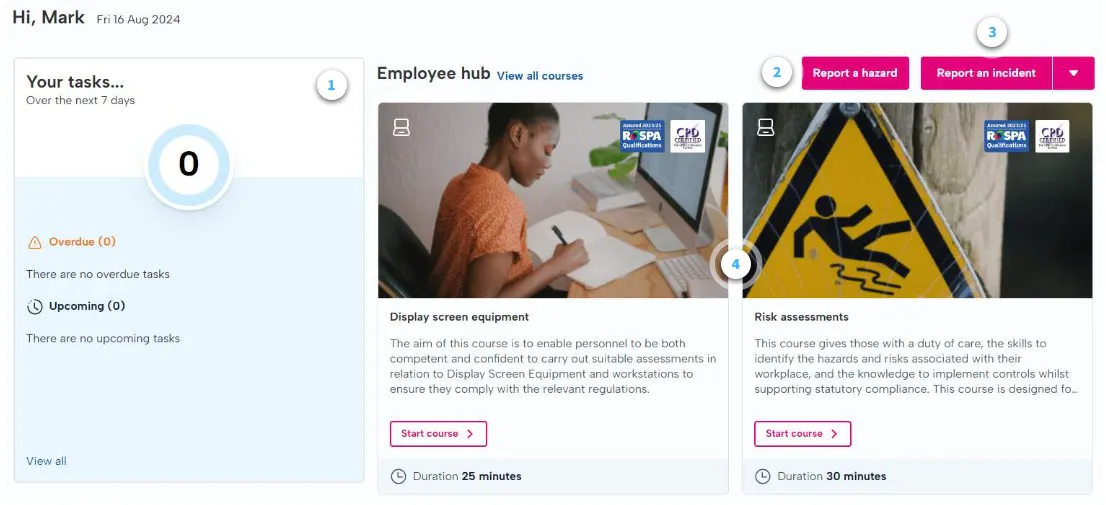
When you log in to BrightSafe the first thing you'll see is your dashboard, this gives you access to all of our e-learning courses and some key information on the latest H&S updates in your area.
Let's take a tour...
- Tasks
Here you can see a handy overview of any assigned tasks (if you have any)
Tasks are assigned from responsibilities added by your employer.
- Report Hazards
Use this handy button to report any H&S hazards with your manager in just a few quick steps.
- Report an Incident
Easily report an accident or near miss in a few steps.
- E-learning
Access our e-learning courses directly from your dashboard to get up-to-date training on a wealth of H&S topics.
Summary
You're off to a fantastic start! You've now learnt all about the dashboard and how to navigate your way around.