- ...>All you need to know about Managed service Payroll from Start to Finish
All you need to know about Managed service Payroll from Start to Finish
This comprehensive guide covers the full Managed Service Payroll journey, from onboarding and data validation to pay runs, reporting, compliance, and ongoing support from BrightHR’s payroll experts.
First Steps to Getting your Managed Service Payroll up & Running
In this handy course you'll be guided through the process of onboarding with our super helpful payroll team to seamlessly approving payment submissions.
The following sections will take you from configuring your employees ready for payroll to ensuring they are paid - and everything in between.
Introduction
About BrightHR Payroll
BrightHR is a one stop shop for employers to manage their HR needs, health and safety, time keeping, expense tracking and payroll.
You can rely on Bright to help your business with its needs in any area and what's better, keeping all of that recorded in the same place!
Over 1,000,000 people trust BrightHR for their HR management, so why not payroll?
What is BrightHR Payroll Managed service?
A fully integrated HR and Payroll system that powers your fully managed payroll service to take out the hard work from setting up your company for payroll, processing pay runs and exporting your payroll data at the end of a pay run.
BrightHR Payroll managed service manages this all for you and minimises the amount of work needed to successfully complete payroll each month!
What are the benefits of using our managed service?
Our competitors have longer lead times to produce your payroll and we also use Faster Payments to give you more time back, and less time spent paying your staff.
How does it work?
What to do First?
Follow our simple steps below, to get your company set-up and onboarding started to get you one step closer to a seamless payroll service.
Step 1
Add your employees to the BrightHR platform
This is the first step to get the ball rolling by adding your staff to the HR software which will eventually feed this information to the payroll engine.
Step 2
Fill out Payroll questionnaire
You can find this in your welcome email or it is also attached in the next lesson. This will allow you to enter the specific payroll details of your organisation such as pay frequency's.
Step 3
Attend your company setup call
Attend your meeting setup by your dedicated onboarding manager to run through your company setup and iron out details about your pay schedule, pay procedures as well the 64-8 form - this authorises us as your PAYE agent with HMRC. You will also want to provide your year to date payroll reports and some payslips from your current provider to use for migration.
Step 4
Sync your BrightHR data to the payroll engine
Once you have agreed the setup details in your first call, you will want to sync your BrightHR employee data to the payroll engine.
Step 5
Payroll data migration
Using the data provided during the setup call, our payroll team will now begin the payroll data migration. This will include a parallel run test which highlight any discrepancies.
Step 6
Review and agree with payroll procedures and parallel run results
After migration and review of parallel test run, data may need to be re-balanced and some payroll procedures altered in accordance with this. Review any changes and approve them to get the account live.
Next Step
The most important part of using your Payroll platform, getting your setup right!
Now that you know a little more about BrightHR Payroll, let's learn all about getting your account setup.
Company Setup
Let's get up and running with Payroll. In this first lesson, we'll cover the basic steps for the payroll setup for your company so you are one step closer to a fully integrated HR and Payroll solution.
What to Expect During the Onboarding Process
Once you have signed up to BrightHR Payroll, we want to get you up and running quickly and efficiently and we can do this through our onboarding process.
Onboarding essentially aims to get your company setup and migration started, as well as get you trained and up to speed on how to use the platform to make changes and validate your payroll.
This will consist of two calls from our team.
First Step
The first step of the process is to ensure your company is setup.
In order to do this, our onboarding and migration team need the payroll data that is vital to your pay run schedules.
Our team will be on hand to help with this step and will cover setup during the first call with you.
Adding your Employees on BrightHR
The first thing to do to get the process started is adding your staff to the HR platform which integrates with the Payroll engine.
This will allow you to integrate / synchronise your staff and vital personal & payroll details to feed the necessary data needed for our team to run your payroll.
Details Required for a Seamless Integration
To help us later when synchronising staff to the payroll engine, you will need to make sure the below details are entered during the initial setup to avoid having to fill these details out later.
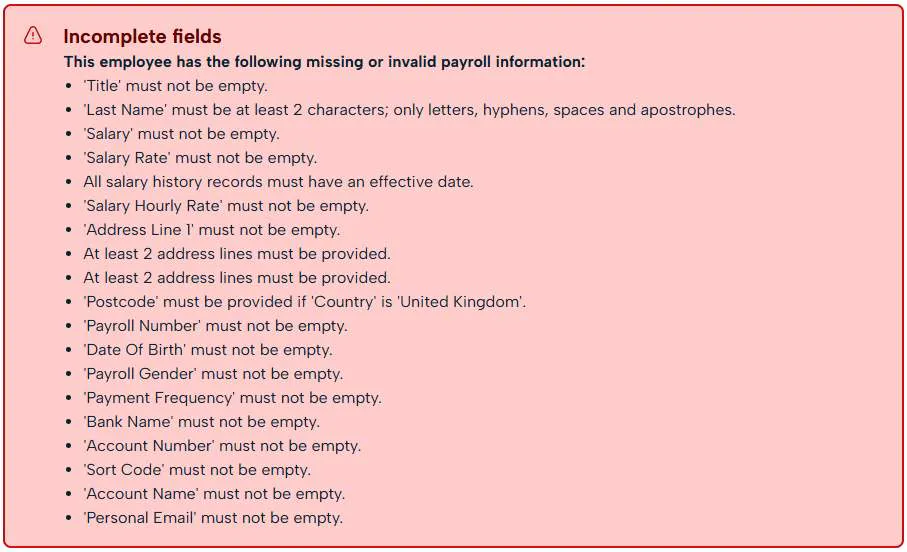
If you do not have all of these details to hand and want to do this later, all you will require to initially add them to the HR system is as follows:
- Full name.
- Valid email address.
- Working hours.
Watch our how to video below to see how to complete the process however, please review the required details for integration before starting to add your employees.
Payroll Questionnaire
Next, we will need your basic company payroll details so we can log your migration request.
You can get this process started using this form here Payroll questionnaire
To fill out your Payroll questionnaire, you will need the following:
- Pay Frequencies - The usual frequency which you pay your employees i.e monthly, weekly etc. You can set up additional pay frequencies here too if some employees are different.
- Payroll Reference Period - The pay reference period relates to the amount of time the employee is paid for, rather than the amount of time between payments (pay frequency). Enter this in a format of days between 1-31.
- Payroll Cut off - The payroll cut off refers to the date you would generally lock your pay run and no further changes are made generally after this period. There can be exceptions that can be pushed through.
- Pensions Setup - The Pension details are important to get contributions correct in each pay run. Provide details of the pension provider, staging date, postponement period, an employer reference, details of how it is taken from the employees pay as well as the contribution % for both EE and ER.
- Eligibility for Government Relief - This refers to Small employers relief, Employment allowance and if you pay the apprenticeship levy.
- Payroll Journals - Finally, we require confirmation on whether you want to interface your accounts package through BrightHR Payroll and some details about your current accounting package.
These details will allow us to get started on your company setup to get the process on its way.
Once the form is submitted, this will then be allocated to an onboarding agent who can then arrange the onboarding call to complete your company setup and begin migration.
64-8
To allow us to resolve queries with HMRC on your behalf, we will need you to digitally sign a 64-8 form.
This will be sent to you via email with your welcome pack.
Onboarding Call One
Once your questionnaire is submitted, your onboarding call will be arranged to review the details provided as well as discuss other important setup details.
Firstly, the onboarding call will welcome you to the service and your payroll specialist introducing themselves and what they will do for you.
Agreeing Payroll Procedures
After you're introduced, we will cover the next steps of company set up and migration.
During this, you will go over the details provided in your questionnaire and agree on a payroll procedure based on the information provided.
As well as the details provided through the questionnaire, the payroll team will also require your government gateway credentials in order to process RTI submissions on your behalf.
Please ensure during your first call you have the below to hand.
Your user ID and password are the credentials your company uses to sign in to the Government Gateway. The team requires this in order to send your RTI submissions.
Please note, if you don't have the above details to hand, this may delay the setup process.
Parallel Run Testing
In order for BrightHR Payroll to ensure there are no discrepancies in your migration, the next step would be to complete some parallel run testing.
Parallel run testing involves you providing us with a year to date report from your current provider of all pay details so that we can then run a parallel test with our software to ensure the results match.
This then allows our payroll specialists to highlight any discrepancies and balance them before the migration begins.
What do I need for parallel run testing?
Once we have the data we can run the test, highlight any discrepancies and attempt to rectify and re-balance any highlighted problems - this will require your review and approval.
Once the test is completed and re-balance approved, we may need to apply appropriate changes to pay procedures previously agreed.
Summary
You're off to a fantastic start! Now that your company setup is complete, we can take a closer look at what comes next...
Next Step
After going through your setup process, we will now need to look at the migration process and some training for the system.
Now, we'll learn how the data migration process works and what to expect.
Data Migration
Data migration is performed by our team and will be completed based on the migration data provided from your old provider as well as details from the questionnaire.
During the migration process, we will also complete the parallel run we mentioned previously and balance any discrepancies to apply changes to the settings to get an accurate account.
Synchronising your Employees to the Payroll Engine
Before the migration begins, you will need to synchronise your employee data from BrightHR to the payroll engine.
First, on BrightHR head to the Payroll section on the bottom left.
Watch the process in full in our how to video below.
How Long Does the Data Migration Take?
The amount of time it takes our time to complete migration is entirely based on how much data they have to migrate - we calculate the time taken based on the number of employees being migrated.
Next Step
Now we are approaching the end of your company setup and migration, let's take a look at the final steps of the onboarding process before we can get your payroll switched over to us.
Final Steps to Complete Onboarding
In this section, we will go through the final steps of onboarding after your migration is complete!
Onboarding Call Two
After the migration is completed and ready for approval, our team will be in touch to arrange a second onboarding call designed to complete the setup and get you in a state of readiness to go live.
Your Onboarding System Training
Firstly, the Payroll onboarding specialist will start with making sure you are happy with how to use the system to ensure that you know how to:
- Upload important documents for review by the team.
- How the payroll schedule works.
- How to approve your payroll data once completed.
- All about the Faster Payments process and how you pay your employees with managed service.
And more.
We will go through all of the above and more later in this guide so you have a permanent record to refer to if you have any issues or are unsure of what to do.
Parallel Run Approval
Once you had your training of how to use the system, your parallel run test results should be available for approval.
The agent will run through this with you and will screen share the results and discuss any changes that have been made as well as the impacts this has on the original payroll procedure agreed upon, the reasons for the change or re-balance.
Ready to go Live
Once you have agreed and approved with the parallel run with the payroll specialist, you will be ready to go live and start your first pay run!
In company setup your account will be in migration mode, once you have agreed everything, the migration mode will be switched to live.
What's next?
You're off to a fantastic start. The company has been setup, the migration is complete and you're ready to go live! Now let's take a look at what's next.