- ...>Everything you need to know about account security
Everything you need to know about account security
Learn how to keep your BrightHR account secure with guidance on safe account setup, strong password management, secure password resets, login lockout protection, and single sign‑on options designed to enhance your account security
Account Security
In this handy course you'll be guided through the process of setting up your BrightHR account, safely and securely.
You'll also find out what to do when you can't log in to your account and are having troubles with logging in.
Account Security Awareness
Keeping your account safe and secure is important to us at BrightHR.
Let's learn all about the features BrightHR offers to help keep your account secure.
Resetting your Password
To keep your account secure, you may want to regularly update your password. This is quick and easy to do within your account - see below how you can do this in a few steps...


First, head in to the 'My Account' section of your BrightHR account.


Next, click 'Change Password' in the Password management box.


Finally, enter your current password and confirm your new one below conforming to the password rules in the middle - If the password is not valid, we will flag this up for you to amend.
Once your password has been updated, this will be ready for you to start using straight away the next time you log in.
You may want to update any stored login details with your new password for the next time you log in.
What if I have Forgotten my Password?
Not to worry! It happens to all of us. From the login screen, you will find a link below the password box to request a password reset.
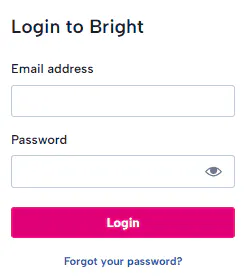
Just simply click 'Forgot your password?' and enter the email address you use to log in with and check your inbox! You should have an email now waiting for you from us with a link to reset your password safely and securely. Set your new password according to our password rules, and you're good to go!
If you have not received an email, be sure to check your junk / spam folder or maybe double check the email you have requested the reset to. If you are unsure which email has been used, ask your employer to check this for you.
Why Am I Locked Out Of My Account?
Be careful to not repeat login attempts if your password or email is incorrect as you will eventually get locked out for 30 minutes. This is an additional security measure to keep your account safe from unauthorised access.
Single Sign-on
What Is Single Sign-on?
Single sign-on (SSO) is an authentication tool that lets you securely access multiple applications and services using just one set of credentials. Put simply, our SSO feature means you can log in to your BrightHR services in one go, with details you’re already familiar with. Just link a Microsoft, Google, Apple or Facebook account, sign in once, then move between Bright applications in a single click.
Watch our handy how-to video to see just how easy it is to set this up...
Two-factor Authentication (2FA)
What is Two-factor Authentication?
Two-Factor authentication – sometimes called “2FA” – works by adding an additional layer of security to your online accounts. It requires an additional login credential – beyond just the username and password – to gain account access, and getting that second credential requires access to something that belongs to you.
How to Enable Two-factor Authentication
You can set this up in a few steps using your BrightHR account and a secondary authentication app such as Microsoft authenticator.


Step 1 - Turn on Two-factor Authentication
First head over to the 'My Account' section and select 'Turn on' in the Two-factor authentication box.
You will then be presented with a code and a QR code - both can be used on your authenticator app to connect your account.

Step 2 - Connect your Authenticator with your BrightHR Account
Once you have connected the app using the code or QR code, you will then be given a code on your authenticator to type in to BrightHR. Enter this code into BrightHR which will fully connect your account. Don't forget to copy or download your recovery codes which will help you if you lose access to your authenticator app.

Step 3 - Start Logging in to your Account Safely & Securely
Now you are fully connected with your authenticator app, you will be prompted with the 2nd layer of security after entering your email and password to confirm your identity using your authenticator app!
You can turn off two-factor authentication at any time via the my account section where you first enabled it.
Using a Shared Device
When using shared devices such as a company PC or laptop, it is important to logout of your account to prevent unauthorised access.
We have added a handy option when logging in to state you're using such a device and this will remind you when logging out to close any other instances of the app that is running in other browsers or tabs.