- ...>Troubleshooting issues with logging in to our apps
Troubleshooting issues with logging in to our apps
Troubleshooting issues with logging in to our apps
In this handy course you'll be guided through issues users encounter when using our app and how we have helped them resolve the problem in the hopes to save you some time!
Login Issues
From time to time you may experience issues trying to login to our apps - don't worry! we're always on hand to help.
Why can't I login?
There are a number of reasons you may not be able to login to the app ranging from connection issues and sometimes just the way your device is set up.
Here are a few reasons you may be blocked from logging in: - Cookies are not enabled for your browser - this can cause an error message when trying to login as the app uses your browser app on the login screen (cookies are needed to access the browser app to help login). - Cache and cookies need clearing - sometimes after using our app for some time, your device will collect data in to your cookies and cache from every login and from time actually using the app. Sometimes you may be presented an error message along the lines of "Oops something went wrong". This is usually resolved by clearing the stored cache and cookies via the device settings. - Your default browser - Since our apps use your browser to login, you may find certain browsers are not compatible which can cause error messages or problems getting past the login screen. This can usually be solved by changing your default web browser to a common browser such as Google chrome, Safari or the devices original default browser. - Storage space - If your device does not have any storage space available, this can sometimes cause the app to crash or prevent it from opening as there is no where to store login data such as cache and cookies. The app does not need a lot of storage space, but some will be needed so if you do experience the app crashing when trying to login, try clearing some storage space via your settings. - Device OS - The operating software installed on your device is used in running the app and installing updates therefore, ensuring your Android or IOS is up to date is important to stop any issues before logging in, or after. Always check if there is an update required in your settings if you experience any issues which ensures your device is compatible with our apps. - Connection issues - Sometimes a problem with your wifi or data connection can stop you from logging in to our apps. A common issue, is when our domain has been blocked from a security system and an easy way to check is if you switch to a different connection such as your mobile data, if it works, this suggests an issue with the wifi which needs to be flagged to your IT team.
Incorrect Email / Password
Sometimes you may be presented with the below message when you attempt to login prompting that your login details are incorrect.
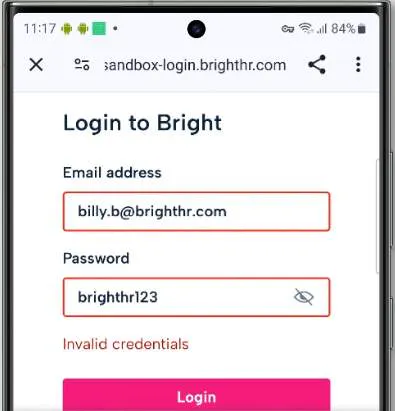
This could be down to a few issues and may not be that you're typing your email or password incorrectly.
- Spaces at the start or end of your email address - if maybe you are copying and pasting your email an additional space may have copied over which then makes the email unrecognisable. Always check the start or end of your email if presented this message and delete any spaces if needed.
- Old login details stored on device - When you change your password for example, your device will always attempt to update or save the details. If you do update your password and do not update the saved details, this can tend to cause problems when logging in by over-writing your new password with the old save causing your credentials to be incorrect. Try deleting any saved passwords and login manually.
- An incorrect email - On BrightHR, you will store a potential of 2 different email addresses, a work / account email, and a personal email. It can be easy to get these mixed up so always try to use both and if you're really unsure, get your employer to check for you!
Try the above when experiencing issues with logging in to our apps. This could help you resolve the problems you're having so you can get on with what is important!
The above is not an exhaustive list and there may be other things that cause login issues.